
How to Use
With the rapid development of AI in the past two years, many excellent open‑source AI projects have emerged on the open‑source community GitHub. Users can choose suitable open‑source AI programs based on their own needs. In practice, we’ve found that any program supporting OpenAI Compatible can use this site’s API, and fortunately, most AI programs are doing exactly that. The unified access method is: Base_Url endpoint + API Key.
The specific API endpoint used depends on the program. Generally, there are three common cases, and the vast majority fall into the first:
https://api.juheai.top
https://api.juheai.top/v1
https://api.juheai.top/v1/chat/completions
Below we list configuration methods for a number of high‑quality AI applications to help users quickly get started and save time.
LibreChat
Introduction: An overseas project that mimics the GPT PLUS UI, and currently the most powerful Chat UI. Its strengths lie in its rich AI feature support: chat, RAG file analysis, plugins, voice, multi‑device sync, and more.
Project URL: https://github.com/danny-avila/LibreChat
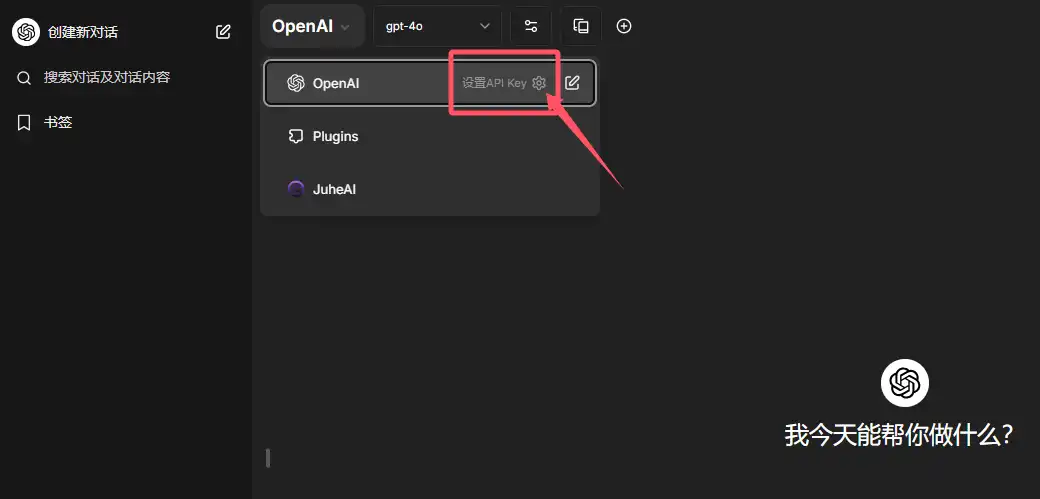
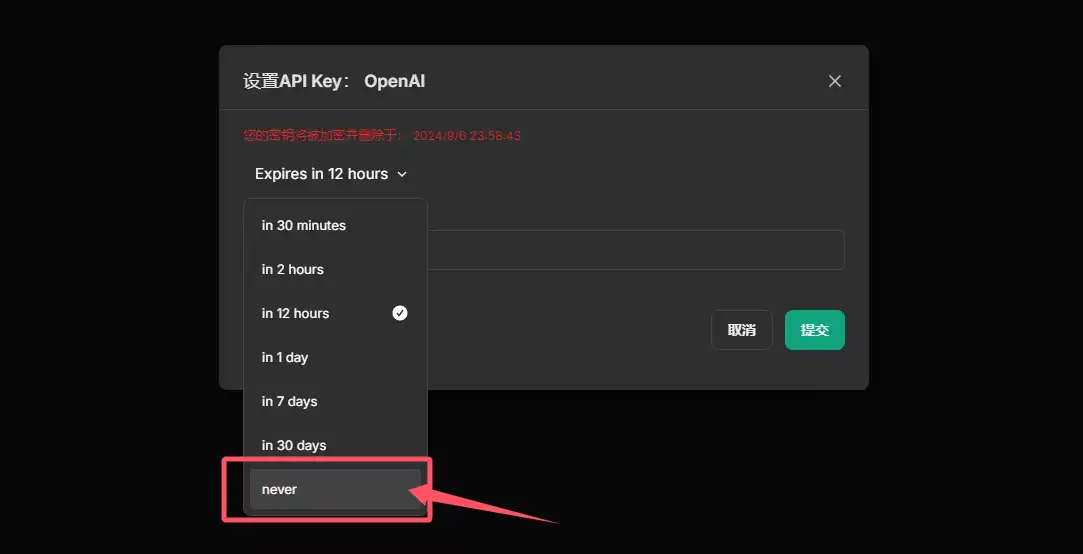
Configuration: After logging in, usually you only need to fill in the API Key. Access URL: https://librechat.aijuhe.top/login.
If you need to self‑host, you can refer to the article “Librechat Quick Deployment Guide”.
NextChat
Introduction: A project by a Chinese developer. It was so smooth and polished that the team was acquired. The new team released a commercial version, but without the original creator’s touch, the style changed. The open‑source version still feels better.
Project URL: https://github.com/ChatGPTNextWeb/ChatGPT-Next-Web
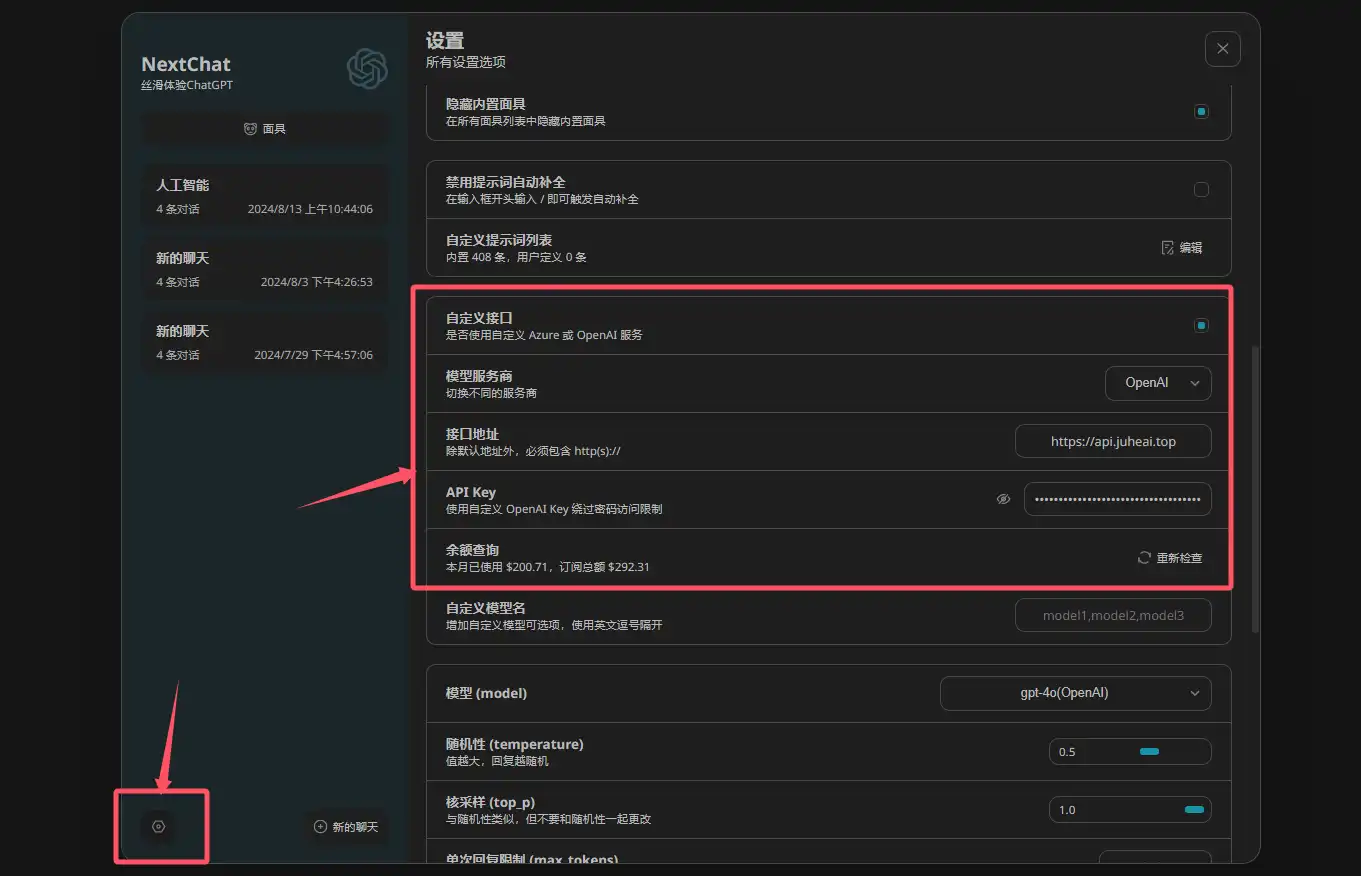
Configuration: In the settings, check “custom API” and fill in the endpoint https://api.juheai.top and your API KEY. Access URL: https://nextchat.aijuhe.top.
For self‑deployment, see the article “Deploy a Low‑Cost GPT Program for Yourself or Your Clients via NextChat (ChatGPT‑Next‑Web)”.
Dooy-AI
Introduction: Originally named
chatgpt-web-midjourney-proxyon GitHub, authored by Dooy. Since the original name was long and hard to remember, we refer to it by the author’s name instead. Besides chat, the project supports visual operations for Midjourney image generation, Suno music, and Luma video creation, making it highly playable.
Project URL: https://github.com/Dooy/chatgpt-web-midjourney-proxy
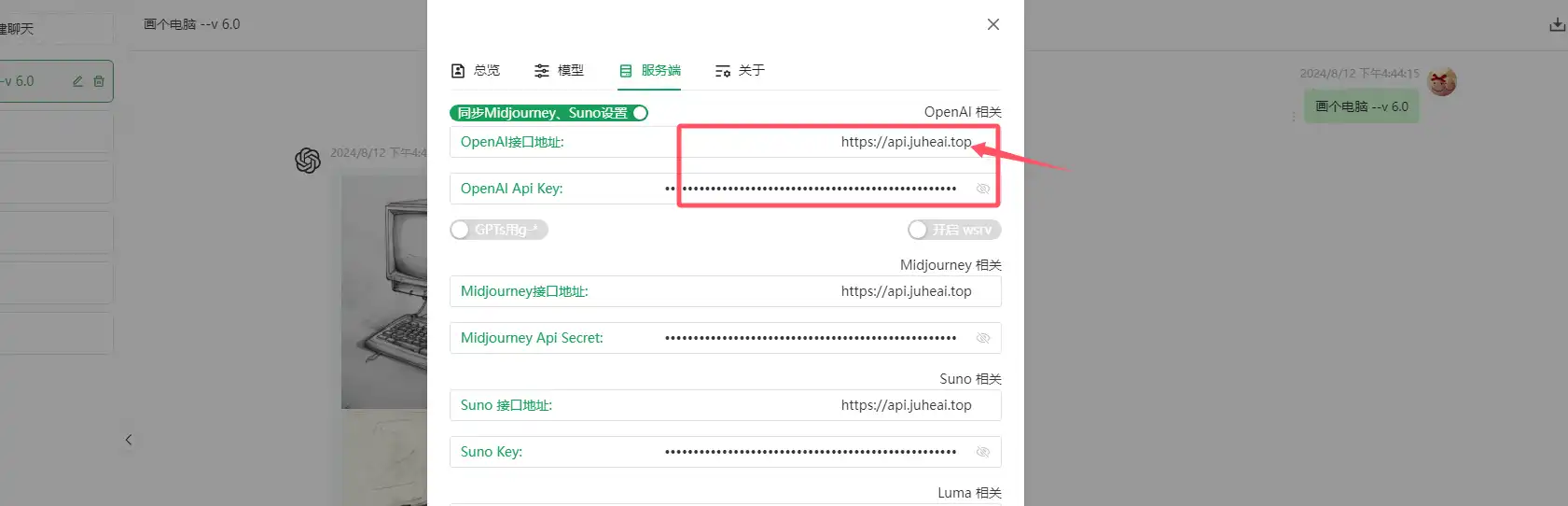
Configuration: In the settings, fill in the endpoint https://api.juheai.top and your API Key. Access URL: https://dooy.aijuhe.top.
For self‑deployment, see “Own a Private GPT: Complete Deployment Guide for chatgpt-web-midjourney-proxy”.
LobeChat
Introduction: A modern open‑source ChatGPT/LLMs chat application and development framework. Supports TTS, multimodal, and an extensible (function call) plugin system, allowing you to create your own ChatGPT/Gemini/Claude/Ollama app with one click for free.
Project URL: https://github.com/lobehub/lobe-chat
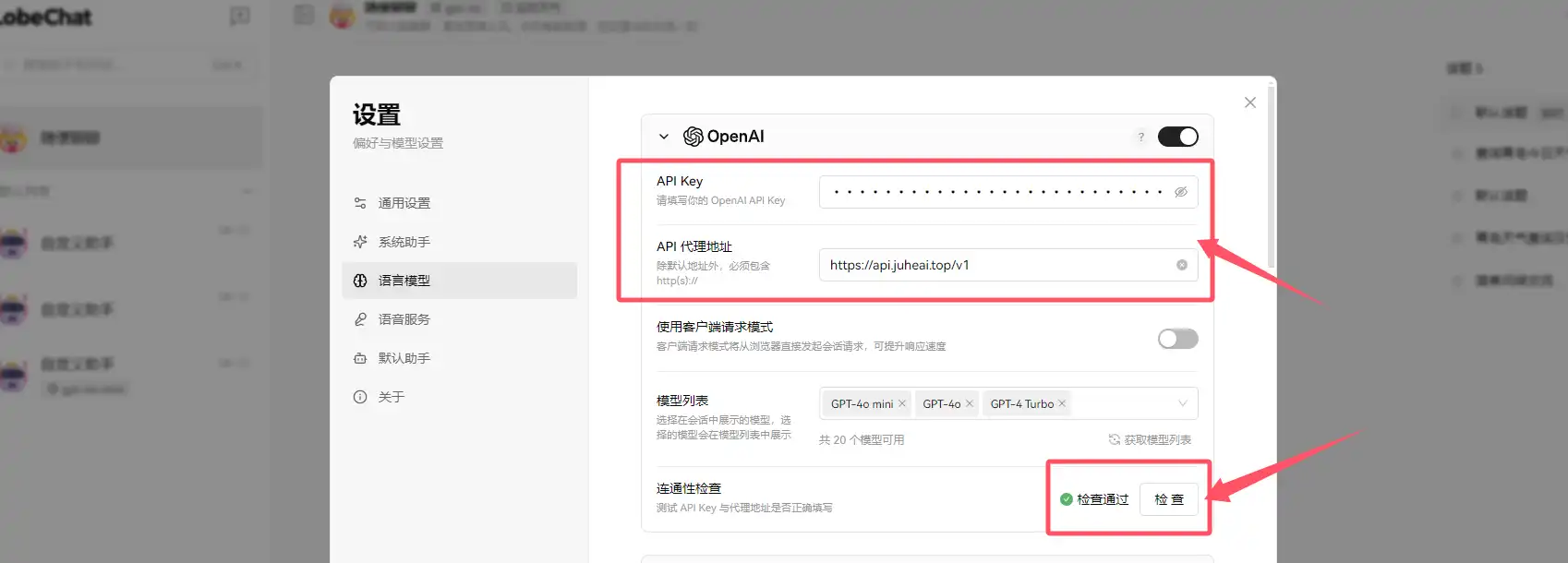
Configuration: In the settings, fill in the endpoint https://api.juheai.top/v1 and your API Key. Access URL: https://lobe.aijuhe.top/.
Chatbox
Introduction: Chatbox AI is a client application and intelligent assistant supporting many advanced AI models and APIs. It is available on Windows, macOS, Android, iOS, Linux, and the web.
Project URL: https://github.com/Bin-Huang/chatbox
Configuration JSON:
{
  "id": "https://www.juhenext.com",
  "name": "JuheNext",
  "type": "openai",
  "iconUrl": "https://www.juhenext.com/wp-content/uploads/2025/10/cropped-Juhenext-200-200.png",
  "urls": {
    "website": "https://www.juhenext.com",
    "getApiKey": "https://www.juhenext.com",
    "docs": "https://www.juhenext.com",
    "models": "https://www.juhenext.com"
  },
  "settings": {
    "apiHost": "https://api.juheai.top",
    "models": [
      {
        "modelId": "gemini-3-pro-preview-thinking",
        "nickname": "gemini-3-pro-preview-thinking",
        "type": "chat",
        "capabilities": [
          "vision",
          "reasoning",
          "tool_use"
        ]
      },
      {
        "modelId": "gpt-4.1",
        "nickname": "gpt-4.1",
        "type": "chat",
        "capabilities": [
          "vision",
          "reasoning",
          "tool_use"
        ]
      },
      {
        "modelId": "text-embedding-3-large",
        "nickname": "text-embedding-3-large",
        "type": "embedding",
        "capabilities": []
      },
      {
        "modelId": "Qwen/Qwen3-Reranker-8B",
        "nickname": "Qwen/Qwen3-Reranker-8B",
        "type": "rerank",
        "capabilities": []
      },
      {
        "modelId": "claude-sonnet-4-5-20250929-thinking",
        "nickname": "claude-sonnet-4-5-20250929-thinking",
        "type": "chat",
        "capabilities": [
          "vision",
          "reasoning",
          "tool_use"
        ]
      }
    ]
  }
}
Immersive Translate
Introduction: A highly acclaimed bilingual web page translation extension. You can use it for free to translate foreign‑language web pages in real time, translate PDFs, EPUB e‑books, and generate bilingual subtitles for videos. You can freely choose AI engines such as OpenAI (ChatGPT), DeepL, and Gemini. It also works on mobile, helping you genuinely overcome information barriers.
Project URL: https://github.com/immersive-translate/immersive-translate
Configuration: After installing the Immersive Translate browser extension, choose OpenAI in the settings and fill in the API Key and custom OpenAI API endpoint: https://api.juheai.top/v1/chat/completions, then you can start using it.


ChatGPTBox
Introduction: Deeply integrates ChatGPT into the browser; everything you need is here. Initially it looks like just a page translation extension, but once you use it you’ll see it offers more, including strong page summarization and chat capabilities, plus many other features waiting to be explored.
Project URL: https://github.com/josStorer/chatGPTBox
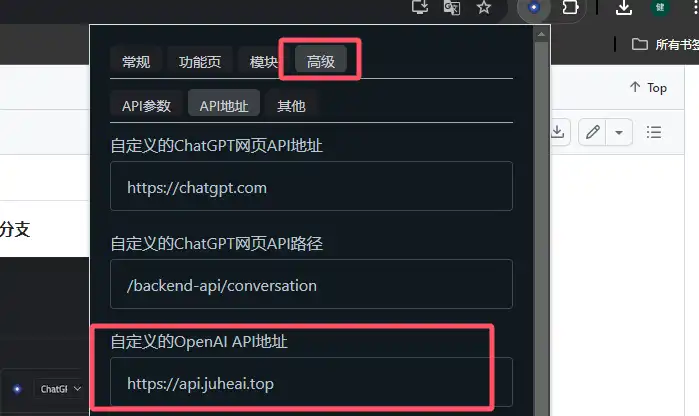
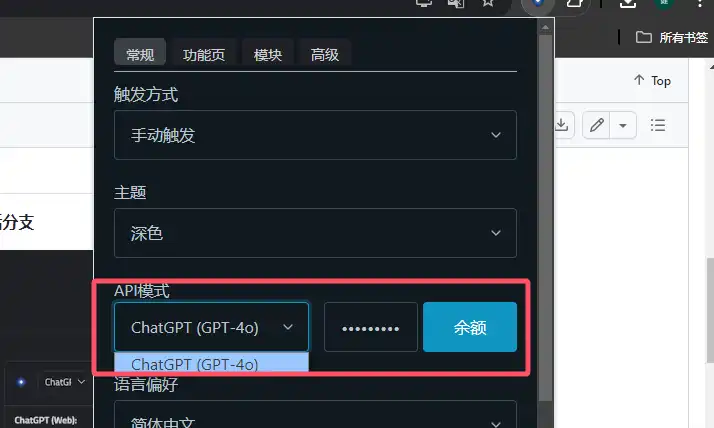
Configuration: After installing the ChatGPTBox extension, go to Advanced → API URL and enter the custom OpenAI API endpoint https://api.juheai.top. Then in the General menu, under API mode, enter your API Key and the corresponding model to use it.
chatgpt-on-wechat
Introduction: A chatbot based on large models that supports integration with WeChat Official Accounts, WeCom apps, Feishu, DingTalk, and more. You can choose GPT‑3.5/GPT‑4o/GPT‑4.0/Claude/Wenxin Yiyan/iFlytek Spark/Tongyi Qianwen/Gemini/GLM‑4/Claude/Kimi/LinkAI. It can handle text, voice, and images, access the OS and the internet, and supports custom enterprise intelligent customer service based on private knowledge bases.
Project URL: https://github.com/zhayujie/chatgpt-on-wechat
Configuration Method 1 (docker-compose): Add the following environment variables in docker/docker-compose.yml:
<!-- Other parameters -->
environment:
      OPEN_AI_API_KEY: 'sk-xxx'
      OPEN_AI_API_BASE: 'https://api.juheai.top/v1'
<!-- Other parameters -->
Configuration Method 2 (direct Python): Add the following to config.json:
<!-- Other parameters -->
"open_ai_api_key": "sk-xxx",
"open_ai_api_base": "https://api.openai.com/v1",
<!-- Other parameters -->
Tavern / SillyTavern

Introduction: As you can see from the image, this is a role‑playing application powered by large models. I haven’t played with it myself; feel free to explore. JuheNext fully supports API integration.
Project URL: https://github.com/SillyTavern/SillyTavern
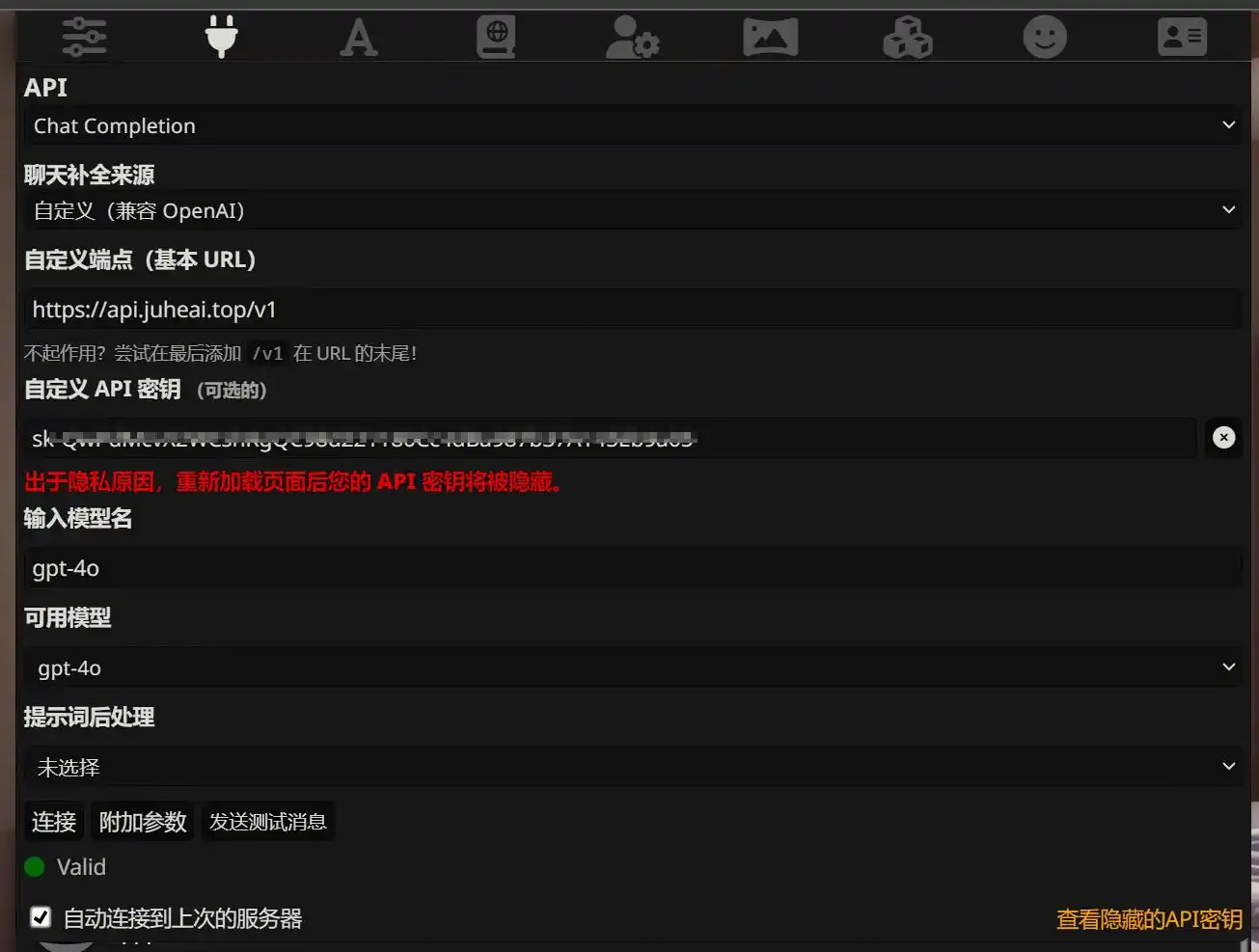
Configuration: In the settings, enter the custom endpoint https://api.juheai.top/v1 and your custom API key.
openai-translator
Introduction: A browser extension and cross‑platform desktop app based on the ChatGPT API for text selection translation.
Project URL: https://github.com/openai-translator/openai-translator
Configuration: In the settings, fill in API URL: https://api.juheai.top and your API key.
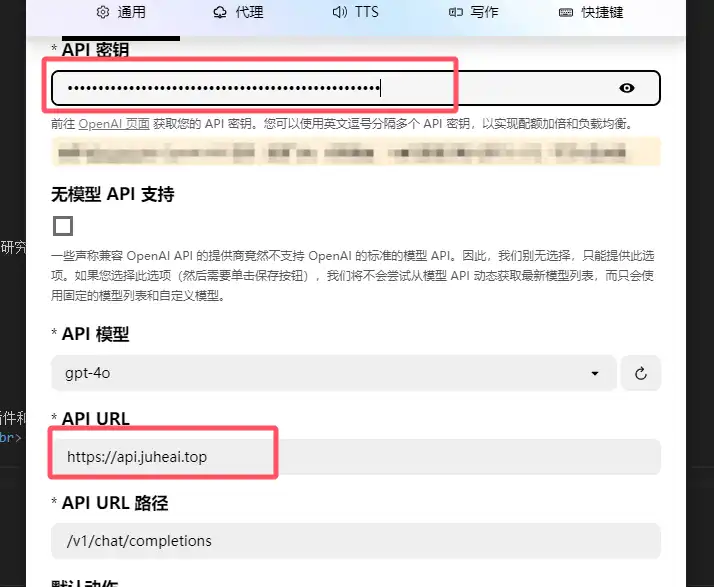
Continue
Introduction: Continue is a leading open‑source AI coding assistant. You can connect any model and any context to build customized auto‑completion and chat experiences in VS Code and JetBrains.
Project URL: https://github.com/continuedev/continue
Configuration: Install the Continue plugin for your IDE and put the following in config.json (remove the original content):
{
  "models": [
    {
      "title": "JuheAI",
      "provider": "openai",
      "model": "gpt-4o",
      "apiBase": "https://api.juheai.top/v1",
      "apiType": "openai",
      "apiKey": "sk-xxx"
    }
  ]
}
FastGPT
Introduction: A knowledge‑base Q&A system based on LLMs, providing out‑of‑the‑box data processing and model invocation capabilities. You can use Flow visual tools to orchestrate workflows and implement complex Q&A scenarios.
Project URL: https://github.com/labring/FastGPT
Configuration: In the relevant configuration file (for Docker Compose deployment, it’s files/docker/docker-compose.yml), modify the endpoint and API Key before startup. There’s no need to deploy a one‑api program.
<!-- Other configuration -->
      # API address of the AI model. Be sure to add /v1. The default here is a OneApi address.
      - OPENAI_BASE_URL=https://api.juheai.top/v1
      # API Key of the AI model. (The default here is a quick test key; be sure to change it after testing.)
      - CHAT_API_KEY=sk-xxx
<!-- Other configuration -->
Dify
Introduction: Dify is an open‑source LLM application development platform. Its intuitive interface combines AI workflows, RAG pipelines, Agents, model management, observability, etc., enabling quick transitions from prototype to production.
Project URL: https://github.com/langgenius/dify
Configuration: After logging in, choose openai-api-compatible in the settings and configure it as shown in the screenshots.
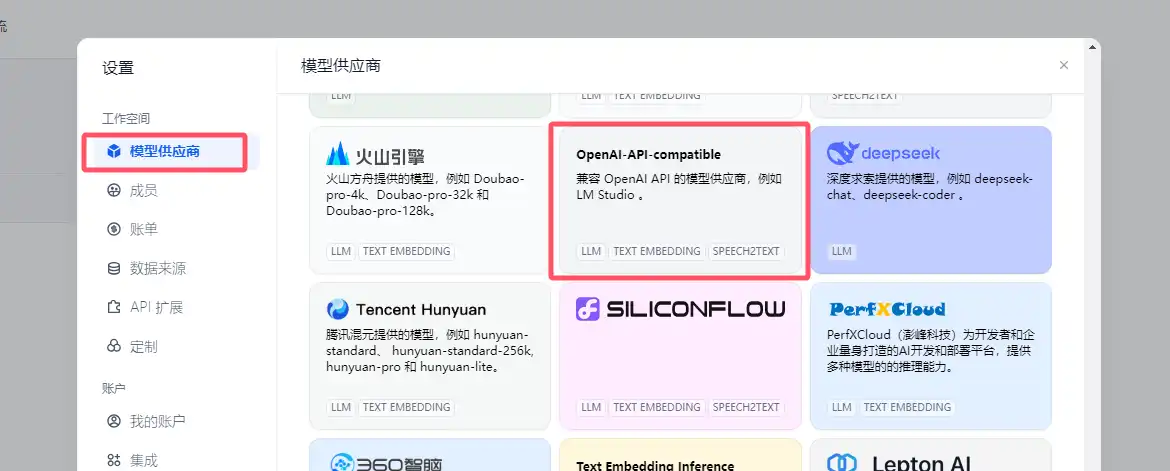
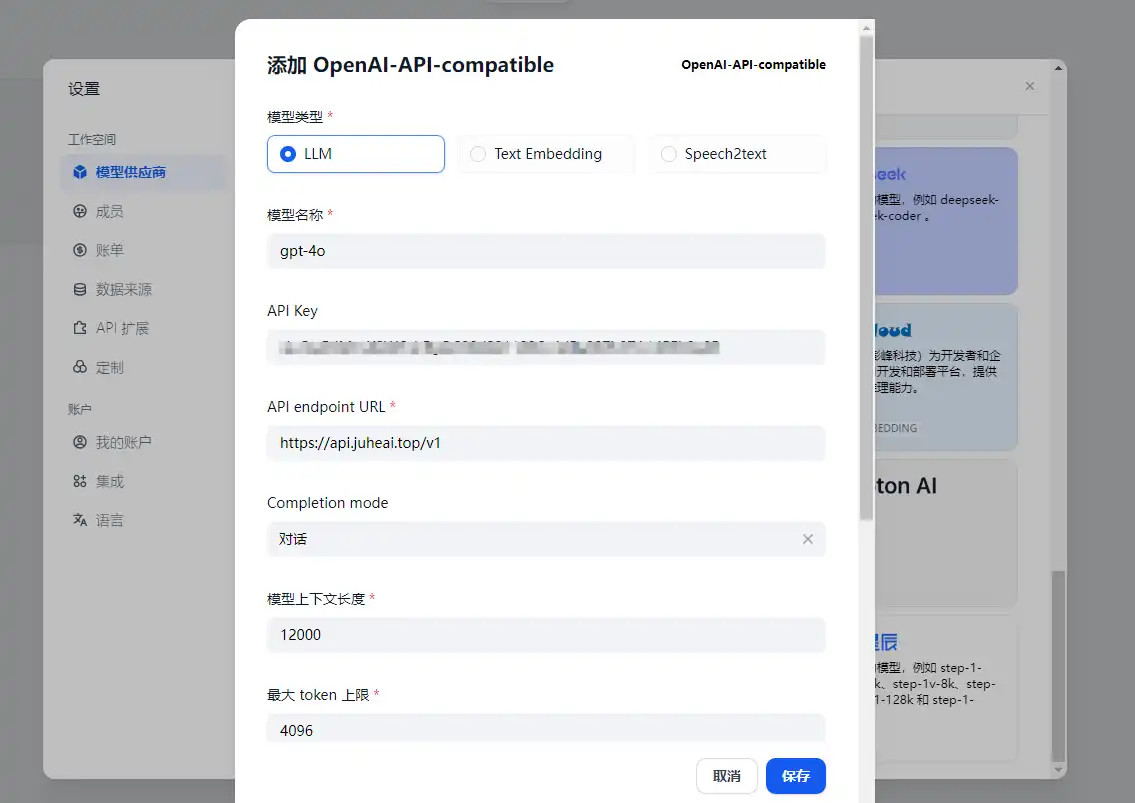
gpt_academic
Introduction: Provides practical interaction interfaces for GPT/GLM and other LLMs, with special optimization for paper reading, polishing, and writing. It features a modular design, custom shortcut buttons and function plugins, project analysis and self‑translation for Python/C++ projects, PDF/LaTeX paper translation and summarization, parallel querying of multiple LLMs, support for local models like chatglm3, and connections to Tongyi Qianwen, DeepseekCoder, iFlytek Spark, Wenxin Yiyan, Llama2, RWKV, Claude2, MOSS, and more.
Project URL: https://github.com/binary-husky/gpt_academic
Configuration: Before starting the program, modify these two environment variables in config.py:
API_KEY = "sk-xxx"
API_URL_REDIRECT = {"https://api.openai.com/v1/chat/completions": "https://api.juheai.top/v1/chat/completions"}
AnythingLLM
Introduction: The all‑in‑one AI app you’ve been looking for. Chat with your documents, use AI agents, highly configurable, multi‑user, and simple to set up.
Project URL: https://github.com/Mintplex-Labs/anything-llm
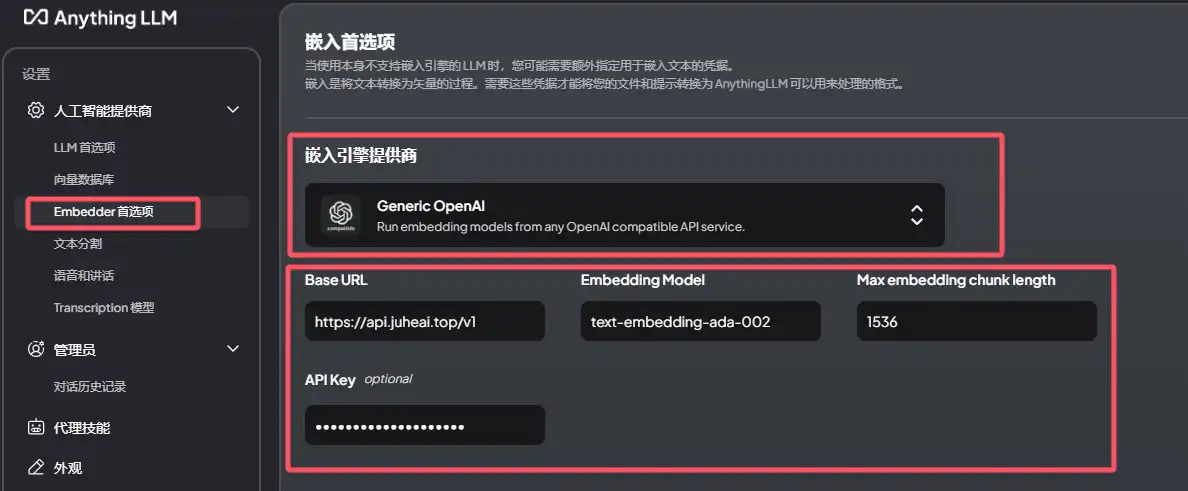
Configuration: In the settings, you can configure LLM and Embedder preferences.
Set LLM provider to Generic OpenAI, BaseURL to https://api.juheai.top/v1, ChatModelName to gpt-4o, and Embedding Model to text-embedding-ada-002. Set Token context window, Max tokens, and Max embedding chunk length as shown in the screenshots:
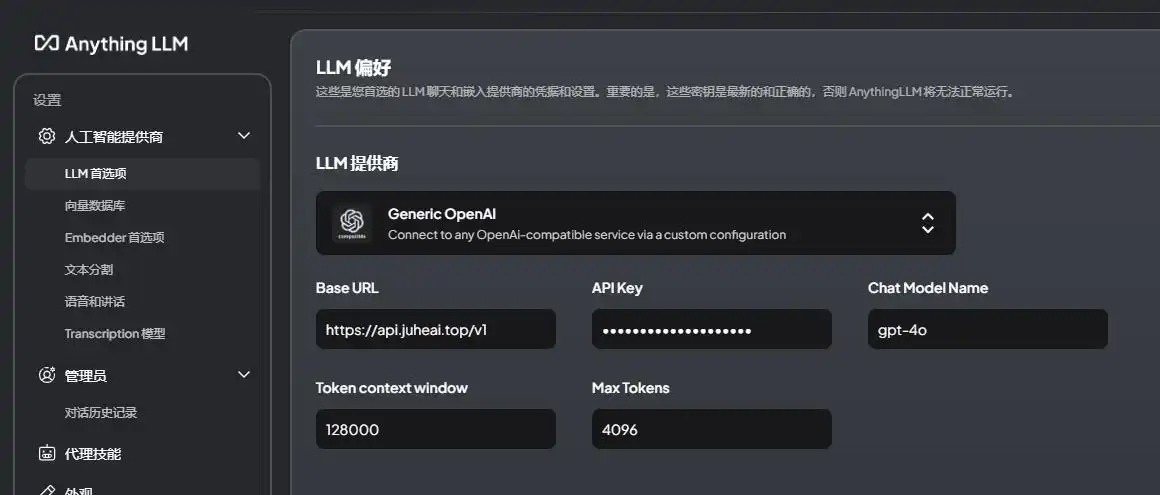
OpenWebUI
Introduction: Open WebUI is an extensible, feature‑rich, user‑friendly self‑hosted WebUI designed to run fully offline. It supports various LLM runners, including Ollama and OpenAI‑compatible APIs. See the Open WebUI documentation for more details.
Project URL: https://github.com/open-webui/open-webui
Configuration: Replace the environment variable OPENAI_API_BASE_URLS with https://api.juheai.top/v1.
Docker Run
docker run -d -p 3000:8080 \
  -v open-webui:/app/backend/data \
  -e OPENAI_API_BASE_URLS="https://api.juheai.top/v1" \
  -e OPENAI_API_KEYS="sk-xxx" \
  --name open-webui \
  --restart always \
  ghcr.io/open-webui/open-webui:main
Docker Compose
services:
  open-webui:
    environment:
      - 'OPENAI_API_BASE_URLS=https://api.juheai.top/v1'
      - 'OPENAI_API_KEYS=sk-xxx'
BotGem
Introduction: BotGem is an intelligent chat assistant app supporting PC and mobile platforms. Using advanced NLP, it understands and responds to your text messages. You can ask questions, share ideas, seek advice, or just chat casually with BotGem.
Project URL: https://botgem.com/
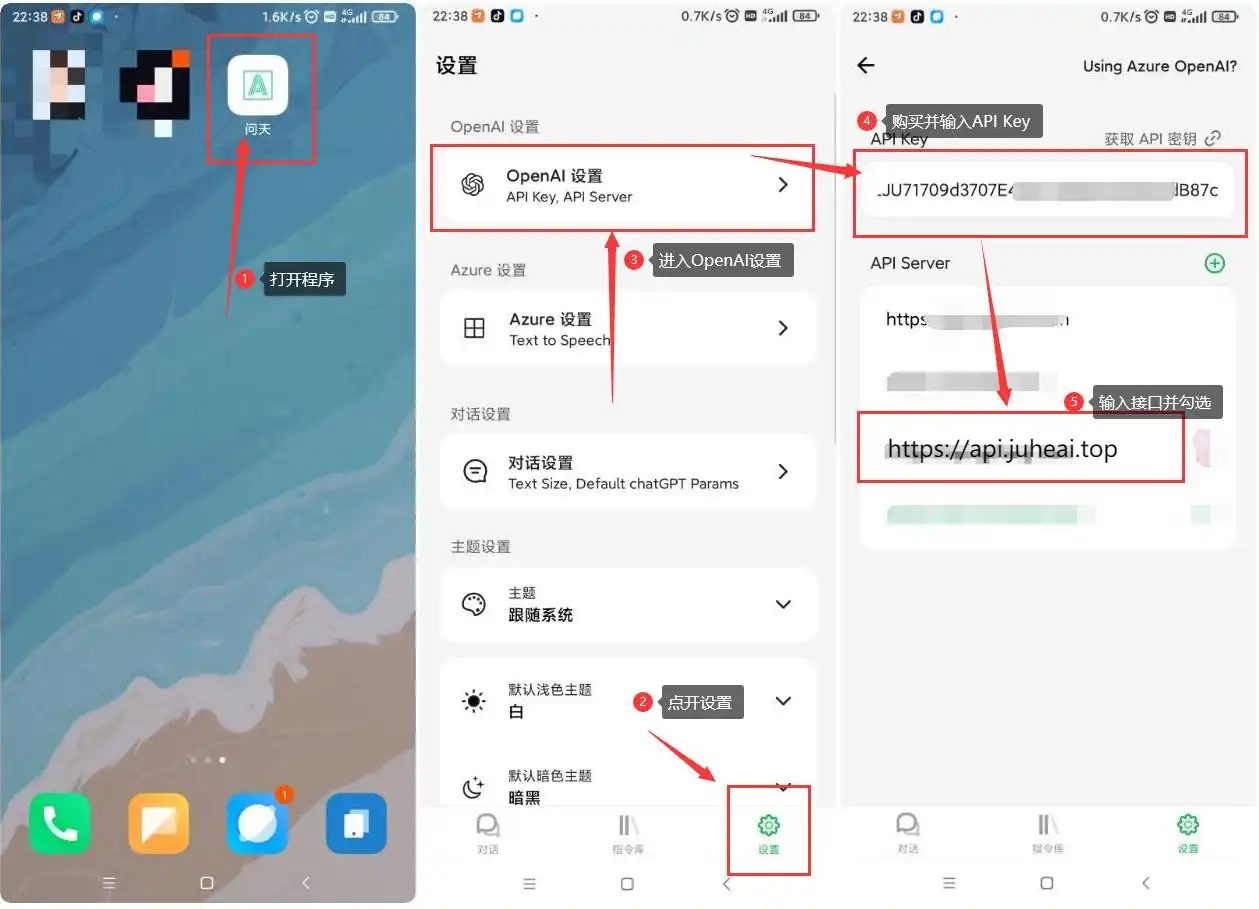
Configuration: Open the settings and modify the API Server and API Key.
Cline
Introduction: An autonomous coding agent in your IDE that can create/edit files, execute commands, etc., step‑by‑step with your permission.
Project URL: https://github.com/cline/cline
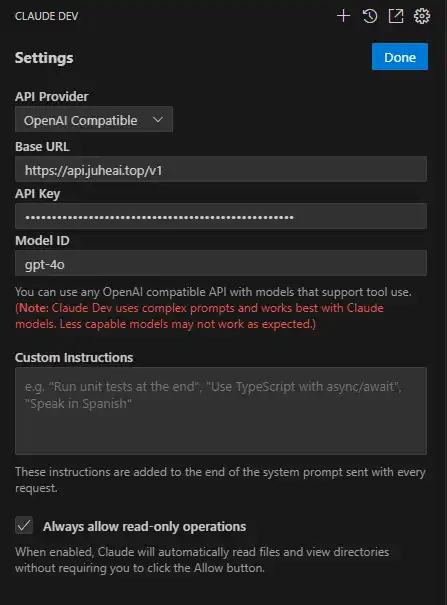
Configuration: Install the plugin in VS Code, open settings, choose OpenAI Compatible, then set Base URL, API Key, and Model ID.
Siyuan Note
Introduction: Siyuan Note is a privacy‑first personal knowledge management system that supports fully offline use and end‑to‑end encrypted sync. It combines blocks, outlines, and bidirectional links to reshape your thinking.
Project URL: https://github.com/siyuan-note/siyuan
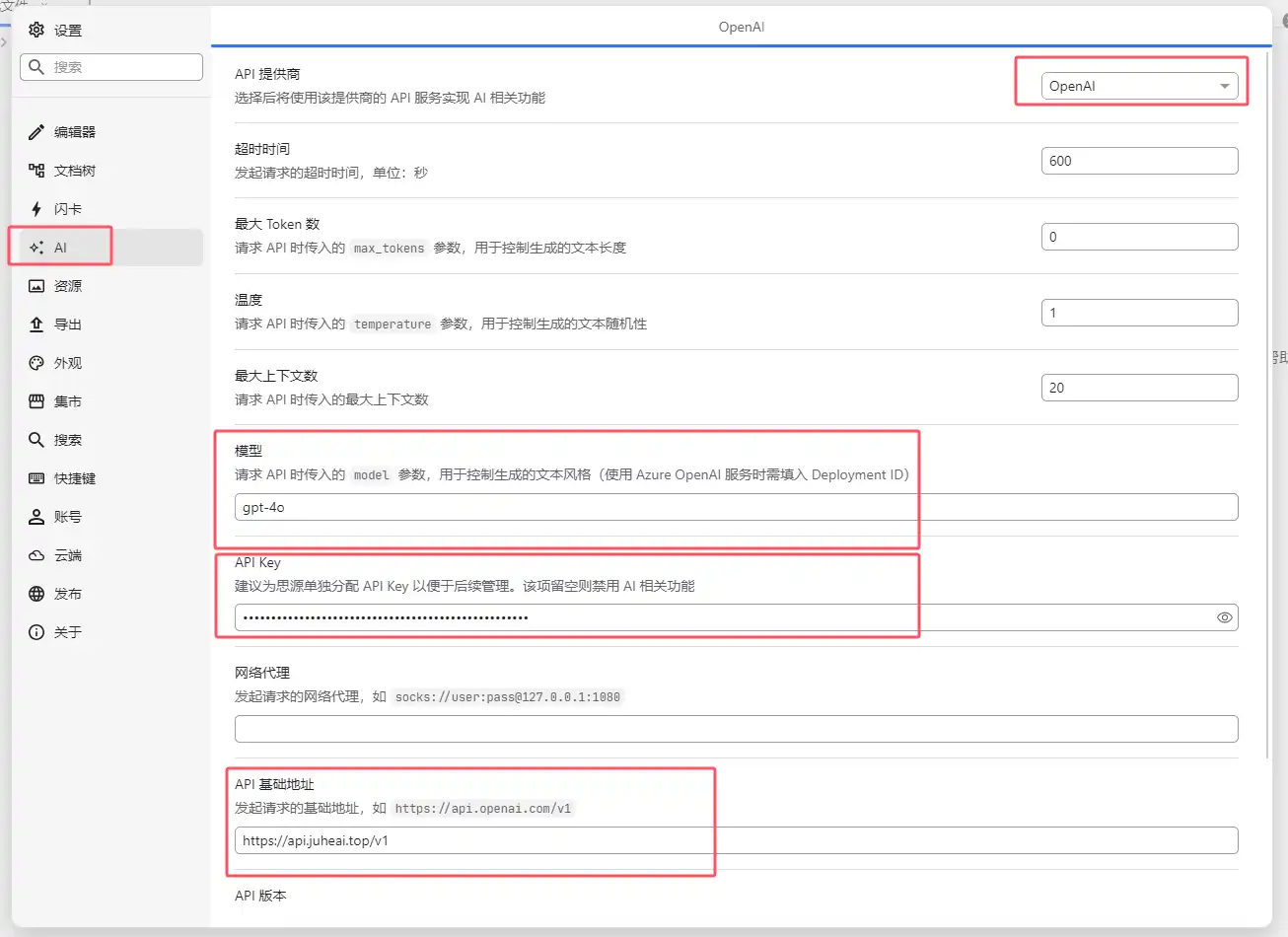
Configuration: In Siyuan’s settings, find the AI section and fill in the model, API Key, and API base URL: gpt-4o, your purchased key, and https://api.juheai.top/v1.
Jan
Introduction: Jan is an open‑source ChatGPT alternative that runs 100% locally on your computer. It supports multiple engines (llama.cpp, TensorRT-LLM).
Project URL: https://github.com/janhq/jan
Configuration: In the settings, find OpenAI and enter your API Key and endpoint https://api.juheai.top/v1/chat/completions.
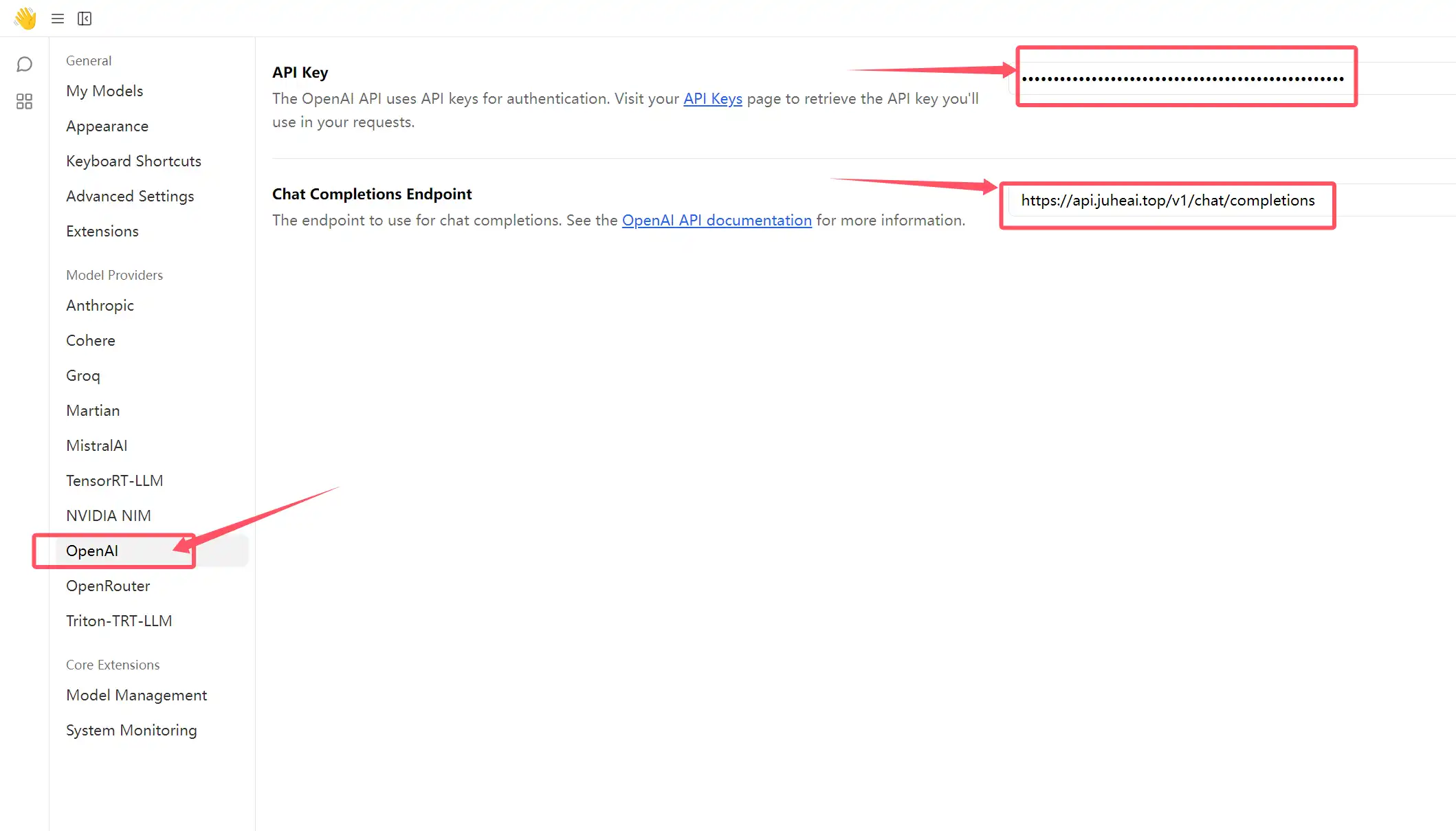
If you need mapping for other models, please contact the site’s customer service.
More models: https://api.juheai.top/pricing
Ragflow
Introduction: RAGFlow is an open‑source RAG engine based on deep document understanding and one of the best tools for building AI knowledge bases.
Project URL: https://github.com/infiniflow/ragflow
Configuration: Open Ragflow >>, click the avatar in the upper right corner, go to Model Providers, then select OpenAI-API-Compatible under Models to Add and click Add Model.
You need to configure four types of models:
chat: general chat modelembedding: vector embedding modelrerank: reranking modelimage2text: image‑to‑text model
First, find available models here: Model list >>, then fill them into Ragflow.
Chat model settings (example: claude-3-7-sonnet-20250219. Regardless of whether it’s OpenAI, Claude, or Gemini, JuheNext normalizes to OpenAI-API-Compatible):
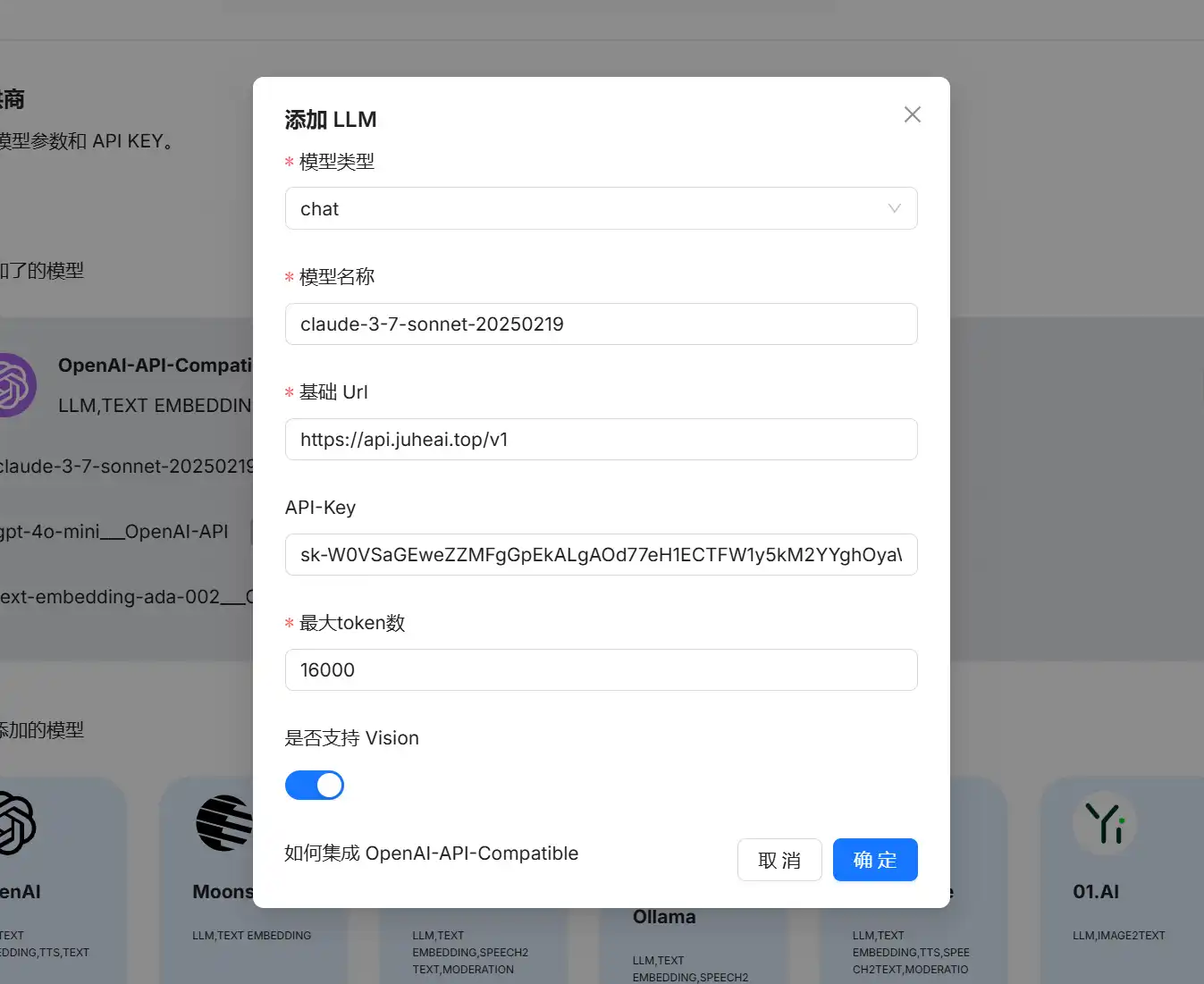
- Model type:
chat - Model name:
claude-3-7-sonnet-20250219 - Base URL:
https://api.juheai.top/v1 - API-Key:
sk-xx(your key) - Max tokens:
16000 - Vision support: checked (this model supports vision; once checked,
image2texttype will be added automatically)
Embedding model settings (recommended: text-embedding-ada-002, high concurrency and good performance)
- Model type:
embedding - Model name:
text-embedding-ada-002 - Base URL:
https://api.juheai.top/v1 - API-Key:
sk-xx(your key) - Max tokens:
1500
Rerank model settings (recommended: bge-reranker-v2-m3)
- Model type:
rerank - Model name:
bge-reranker-v2-m3 - Base URL:
https://api.juheai.top/v1/rerank - API-Key:
sk-xx(your key) - Max tokens:
1500
CherryStudio
Introduction: An AI chat client that supports integration with multiple providers.
Project URL: https://github.com/CherryHQ/cherry-studio
Configuration:
1. OpenAI‑Compatible Format
This method is suitable for most models. Endpoint: v1/chat/completions.
- Go to
Settings→Model Providers, clickAddat the bottom; set provider name toJuheNext-Compatible, provider type toOpenAI. - Enter your JuheNext
API-KeyinAPI Keyandhttps://api.juheai.topinAPI URL. - Go to
Manage, choose your desired model and start chatting. This mode supports most models including Gemini and Claude and is recommended.
2. OpenAI - Response Format
This method is suitable for advanced models like o3, o3-pro, with endpoint v1/responses. Typically not recommended except for these advanced models.
- Go to
Settings→Model Providers, clickAdd, name itJuheNext-Response, choose provider typeOpenAI-Response. - Enter your
API-Keyandhttps://api.juheai.topas theAPI URL. - Go to
Manage, choose theo3or later series models to chat.
3. Gemini Format
Native Gemini format, supporting more parameters (e.g., enabling thinking display mode).
- Go to
Settings→Model Providers, clickAdd, name itJuheNext-Gemini, choose provider typeGemini. - Enter your
API-Keyandhttps://api.juheai.topasAPI URL. - Because this node cannot automatically fetch the model list, add models manually. Model list: https://api.juheai.top/pricing.
- Go to
Manageand select the desired Gemini model.
4. Anthropic Format
Native Anthropic format, supporting more parameters.
- Go to
Settings→Model Providers, clickAdd, name itJuheNext-Anthropic, choose provider typeAnthropic. - Enter your
API-Keyandhttps://api.juheai.topasAPI URL. - As above, models need to be added manually. Model list: https://api.juheai.top/pricing.
- Go to
Manageand select the desired Anthropic Claude model.
Roo Code
Introduction: Roo Code lets you have a whole team of AI agents in your code editor.
Project URL: https://github.com/RooCodeInc/Roo-Code
Configuration:
- In
Settings, setAPI ProvidertoOpenAI Compatible. - Set
OpenAI Base URLtohttps://api.juheai.top/v1and enter your purchasedAPI Key. - Manually specify the model (e.g.,
gemini-2.5-pro). - Check
Use legacy OpenAI API format. - Adjust other options as needed.
- Start using it.
TIP
Open‑source projects are hard‑won. After using them, please consider visiting the project page and giving the authors a star. We will continue adding more supported open‑source AI programs. If you’ve used a good open‑source AI project, you’re welcome to contact us so we can include it.